 DockDuck
 Documentation
Privacy & data
DockDuck is a local-first file manager. It collects almost nothing, keeps your files and credentials on your Mac, and has no cloud-provider integrations. Here's exactly what that means.
DockDuck manages files on your Mac. It is local-first by design: your folders, selections, and the contents of your files never leave your computer for our servers. The only network activity is the account and licensing handshake, and whatever you initiate by connecting to a remote server.
What we collect
Almost nothing. There is exactly one optional, off-by-default control:
- Share Technical Data (Settings → About): anonymous usage diagnostics. It ships off, and turning it off again is fully reversible. We never tie it to your files or folder names.
We do not index your disk to a server, upload thumbnails, read document contents, or log which files you open.
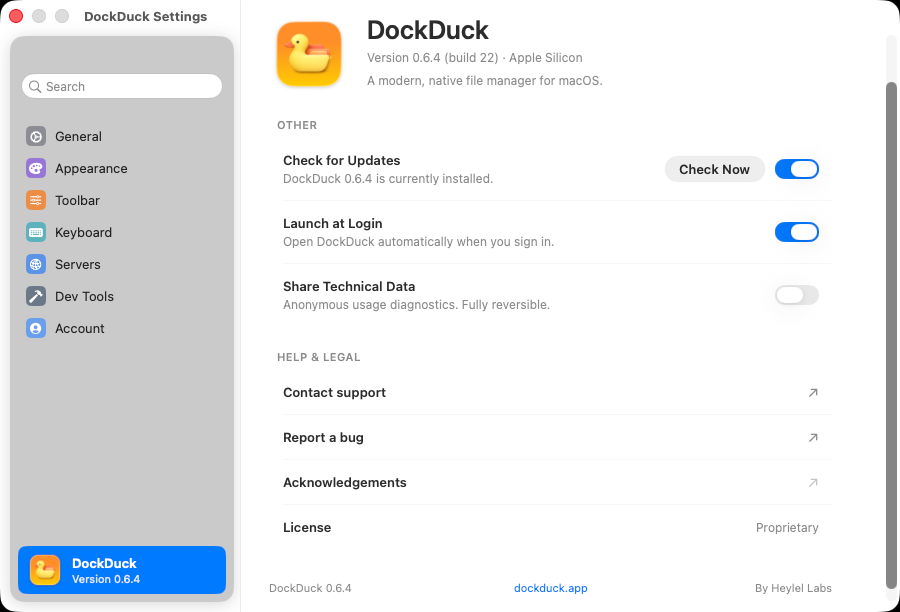
When you use Contact support, DockDuck deep-links a small set of system facts (app version, macOS version, architecture, locale) into the web support form so it auto-fills. You can see and edit them before sending.
Your account
A DockDuck account exists for one reason: licensing. Signing in lets us associate your purchase with you across your devices.
- The 14-day free trial needs no account. It is tied to this Mac through an anonymous device identifier, a one-way hash that says nothing about you or your files. Because the server keeps the trial dates for that identifier, the trial survives reinstalling the app, and equally, it can’t be reset by reinstalling.
- Starting the trial records which version of the Terms this Mac agreed to, and when.
- An account stores your name, email, and license state. That’s it.
- Sign-in happens through your browser; DockDuck never sees your password. The session tokens it receives are stored in the macOS Keychain (see Keychain & signing).
You can use DockDuck’s core file management during the trial without thinking about any of this. The account only gates Pro features.
No cloud providers
DockDuck has no integrations with Dropbox, Google Drive, OneDrive, S3, or any other cloud storage service, by deliberate design, not as a missing feature. Because of that, DockDuck never asks for or stores your Google, Microsoft/OneDrive, Box, or other cloud-account logins. You reach those services through the folders their own official apps create on your Mac, so your cloud sign-in stays entirely with that app, never with us.
The only remote connections DockDuck makes are the ones you set up yourself: SFTP, SMB, WebDAV, and FTP servers, which it mounts as folders. Those connections go straight from your Mac to your server. We’re never in the middle, and we never see the data that flows across them. See remote servers for the full picture.
Local-first, by default
- Files stay put. DockDuck reads and writes the filesystem directly, like Finder does. Nothing is copied to a DockDuck server.
- Settings stay local. Your preferences, shortcut bindings, and saved server list live on your Mac.
- Credentials stay in the Keychain. Server passwords, SSH host-key trust, and TLS certificate trust are all stored by macOS, encrypted, never in a plain-text file. Details in Keychain & signing.
Where to go next
- Keychain & signing: where credentials live, code signing, and host-key trust.
- Settings: the Account and About panes covered here.
- Remote servers: the only connections DockDuck makes on your behalf.