 DockDuck
 Documentation
Install DockDuck
System requirements, downloading the app, moving it to Applications, opening a signed and notarized build, and keeping it up to date.
What it is. Everything you need to get DockDuck onto your Mac and running. When to use it. The first time you install, when you set up a new Mac, or if you ever need to reinstall.
Requirements
| Requirement | Detail |
|---|---|
| macOS | macOS 15 (Sequoia) or later |
| Mac | Apple silicon or Intel |
| Account | None to try it. An email when you buy a license, no license code |
DockDuck is distributed as a universal app, so the same download runs natively on both Apple silicon and Intel Macs.
Install
Download DockDuck from dockduck.app. You’ll get a
disk image (.dmg).
Open the downloaded disk image, then drag the DockDuck icon onto the Applications folder shown in the window.
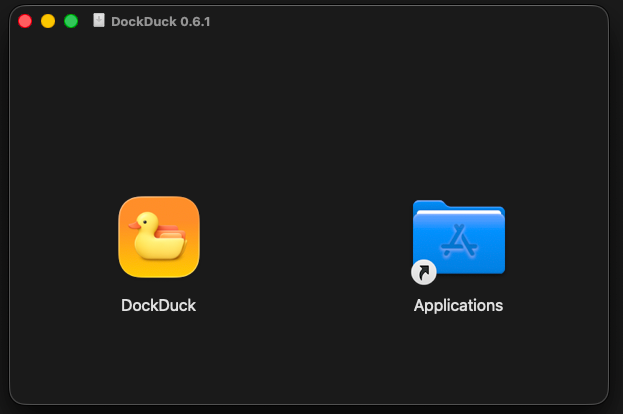
Eject the disk image and launch DockDuck from your Applications folder or Launchpad.
First open of a signed app
DockDuck is signed and notarized by Apple, so it opens like any other Mac app you download from a developer’s site. The first time you launch it, macOS may show a confirmation that you downloaded it from the internet. Click Open to continue.
If you don’t see a confirmation, there’s nothing to do. The app just opens. Notarization means macOS has already checked the app with Apple before you ran it.
Keeping DockDuck up to date
DockDuck has a built-in updater. It checks for new versions in the background and, when one is available, shows you the release notes and an install button. The update downloads and installs in place, then relaunches.
- Updates are for everyone. Every version is delivered to every user, whether you’re on the trial or have a license. Updates are never gated.
- Check manually anytime. You can trigger a check yourself from the app’s settings, where you can also turn automatic checks on or off.
The updater verifies each download’s signature and the developer’s identity before installing, so an update can’t replace DockDuck with anything else.
Where to go next
- First launch: onboarding, your trial, and permissions.
- The interface: a quick tour of the window.
- What is DockDuck: the product in one page.