Finder, reimagined. Beautifully native.
DockDuck is a fast, native macOS file manager: tabs, pinned files, tags, and instant search, all in one window that opens the moment you click. Built entirely in Swift, with none of the weight.
Free Pro Trial · macOS 15+ · Apple Silicon & Intel
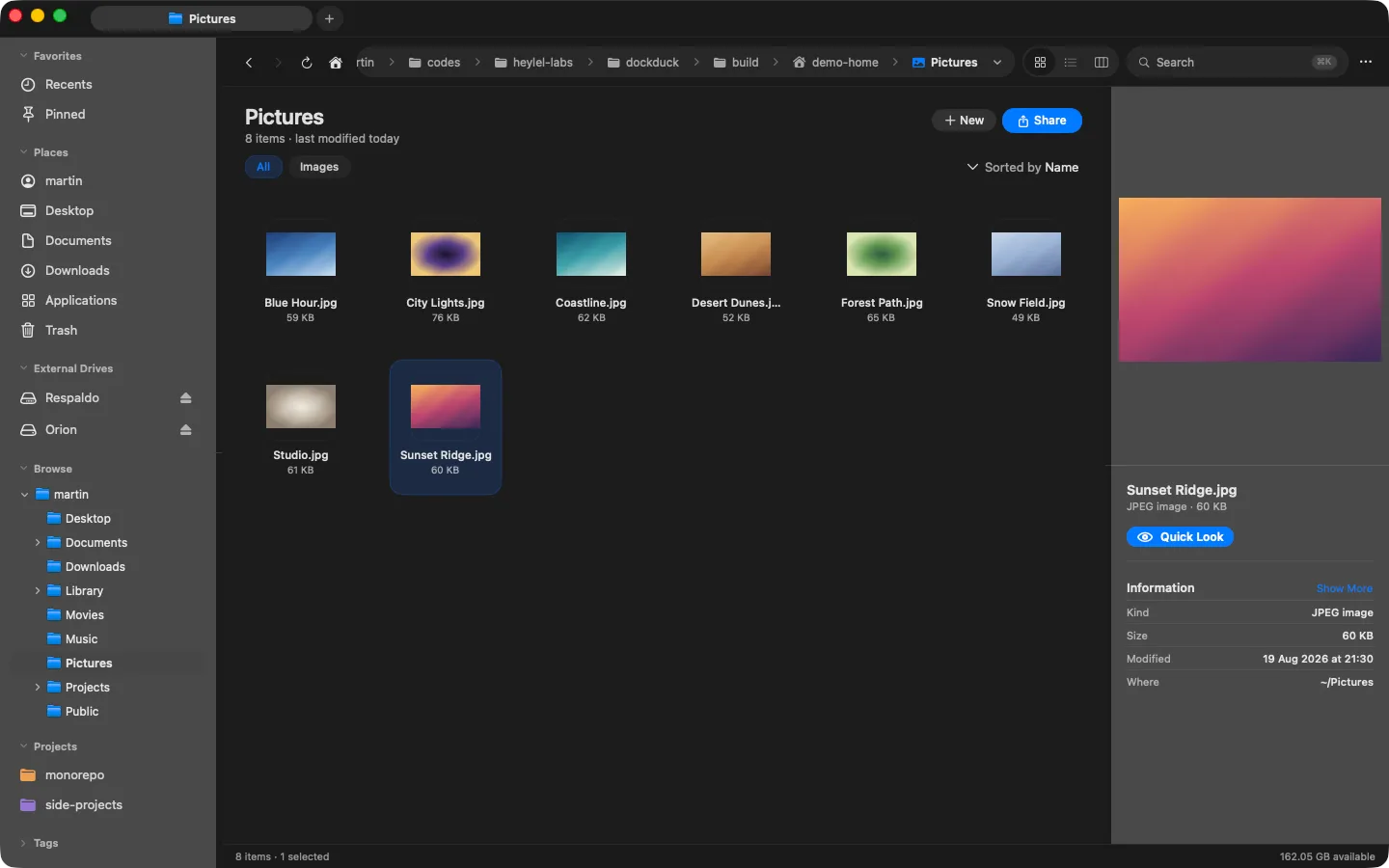
Everything Finder isn't.
A file manager that's powerful and beautiful: the pro tools you paid other apps for, in something that finally feels native to macOS.
Native & instant
No spinners, ever. Folders, icons and previews render on the first frame. 100% Swift, zero Electron.
Pinned Start dashboard
Your most-used files and folders, one keystroke away. Plus Recents and tags, on a dashboard that opens with the app.
Dual-pane power
Two folders, side by side. Move and compare without juggling windows: the workflow pros switch for.
Compare before you copy
Point two panes at two folders and DockDuck lines them up: identical, modified, or only on one side. Then move what matters.
And a long list of niceties.
Browse
- ✓ Tabs, pinned tabs & multiple windows
- ✓ Workspaces: save & switch whole window setups New
- ✓ Grid, List & Column views
- ✓ Sidebar with volumes, free space, tags & recents
- ✓ Editable breadcrumb with path history
Find
- ✓ Instant search
- ✓ Filter by file type
- ✓ Sort by name, size, date or kind
- ✓ Smart folders: saved searches
Organize
- ✓ Finder tags & color labels
- ✓ Organize into Folders: sort by kind, date or letter New
- ✓ Batch rename with patterns
- ✓ Shelf: stage files while you navigate
Files
- ✓ Copy, move, rename, duplicate, trash
- ✓ Quick Actions: convert images, combine PDFs New
- ✓ Unlimited undo / redo
- ✓ Compress & extract: ZIP, 7-Zip, TAR, RAR
- ✓ Folder sync & compare
Preview & info
- ✓ Quick Look + live preview panel
- ✓ Get Info with permissions & metadata
- ✓ Reveal in Finder · Open in Terminal
- ✓ AirDrop & system Share · Copy as path
Window & system
- ✓ ⌥Tab cross-app window switcher
- ✓ Quick switcher across all DockDuck windows
- ✓ Set DockDuck as your default file manager
- ✓ Fully remappable keyboard shortcuts
- ✓ Light / Dark / Auto · auto-updates
Fast, light, and out of your way.
DockDuck opens the instant you click, stays quiet in the background, and feels like it was always part of your Mac. You'll just notice everything is smoother.
Opens instantly
Click and your files are right there. No loading screens, no spinners, ever.
Light on your Mac
It stays out of the way of everything else you're doing, and it's easy on your battery.
Silky smooth
Fly through folders with thousands of files. Scrolling never stutters, never lags.
Feels like home
Designed to look and feel like an app Apple would make: clean, familiar, and right at home on macOS.
Pay once. Or once a year.
DockDuck is a Mac app, not a SaaS. No subscription, no auto-renew, no tricks. Buy Lifetime once and it's yours forever, or take Annual for a year of updates, renewed by hand, never on autopilot.
Every Pro feature. Pay once. Yours forever, with all future updates.
All Pro features for one year. Manual renewal, no auto-charge.
- ✓ Everything you need to replace Finder
- ✓ Workspaces: save & switch window setups New
- ✓ Clouds in the sidebar: iCloud Drive, Dropbox, Google Drive & Box New
- ✓ Connect to servers: SFTP, SMB, WebDAV & FTP
- ✓ Dual-pane / multi-pane browsing
- ✓ Quick Actions: convert images, combine PDFs New
- ✓ Organize into Folders: tidy any folder by rule New
- ✓ Batch rename with patterns
- ✓ Advanced archives: 7-Zip, TAR & RAR
- ✓ Folder sync & compare
- ✓ Shelf: stage files while you navigate
- ✓ Smart folders (saved searches)
- ✓ Address-bar commands: Terminal, Git, your editor
- ✓ ⌥Tab window switcher with live previews
- ✓ Alternate Dock icons New
- ✓ 3 Macs per license · priority support New
- ✓ All future updates, no expiry
- ✓ One year of updates
- ✓ No auto-charge, renew manually
Prices in USD · one-time or annual · 14-day money-back guarantee, no questions asked.
Ready when you are.
Download DockDuck and try every Pro feature free for 14 days. No card required.
Universal build · macOS 15 Sequoia or later